
Size
A node has three scalars that affect how big things render:
| Attribute | Type | What it controls |
|---|---|---|
sizeScale | 0+ | Multiplier on the default node diameter (default 1) |
size | 0–1 | Absolute diameter as a fraction of the cell |
labelScale | 0+ | Multiplier on the label's font size (default 1) |
The default node diameter is 0.45 × cell. sizeScale=1.2 stretches that to 0.54; size=0.7 ignores the default entirely and fixes the diameter at 0.7 × cell.
Relative vs absolute
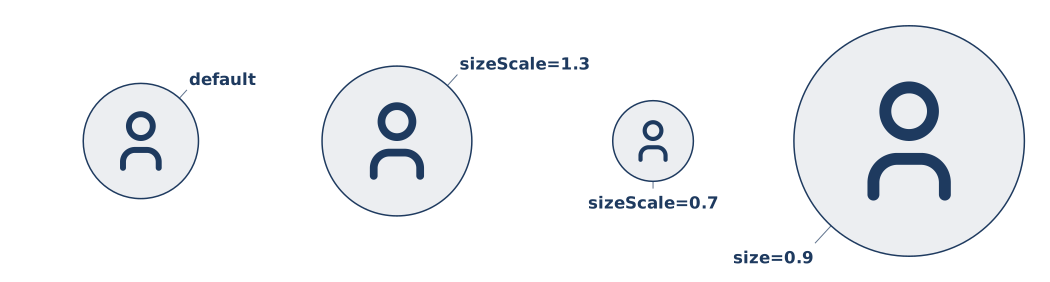
Use sizeScale when you want to say "a bit bigger than usual" — it composes nicely with theme tweaks, since the baseline can be changed centrally without breaking your relative ratios.
Use size when you want an exact target — for instance, a giant hero node that should take up most of its cell regardless of the theme baseline.
If both are set on the same node, size wins and sizeScale is ignored.
Label scale
labelScale is independent of the node size — it scales only the label text. Use it when you have one very long label that needs to fit, or when you want to emphasize a single node without resizing its icon:
icon :hero @B2 tabler/star "HERO" labelScale=1.4
icon :tiny @C2 tabler/user "tiny" labelScale=0.8
What cell size actually is
Cell size is set at the document level — either via the cell-size CLI flag, or cellSize on DiagramDef. The default is 256 px. size=0.45 at that default means a ~115 px node diameter.
See Document › Grid for how cellSize, columns, and rows fit together.