
Spanning
A region isn't limited to a single rectangle. You can join rectangles along shared edges to produce L-shapes, T-shapes, or more complex "blobs" — Gridgram renders the union as one outline, so the result looks like a single shape rather than overlapping boxes.
Single-cell or single-range
region @C2 "one cell"
region @A1:D1 "Top row"@c,ron its own is a 1×1 region — a single highlighted cell.@c,r-c,ris a range (both ends inclusive), so@A1-D1covers cells 0, 1, 2, 3.
Multi-entry (L / T / compound)
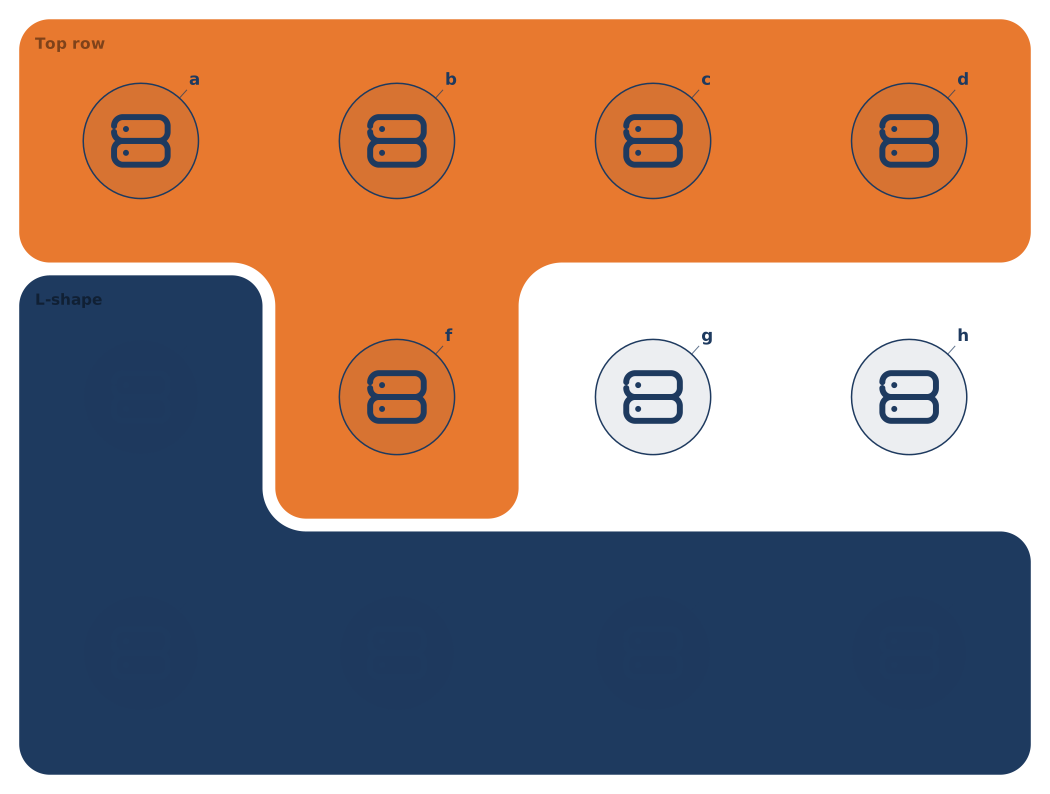
region @A2:A3 @A3:D3 "L-shape" color=primary/14Multiple @ entries (space-separated) are unioned into a single shape. The example above combines a vertical strip (col 0, rows 1–2) with a horizontal strip (row 2, cols 0–3), producing an L.
Connectivity rule
Multiple entries must touch along an edge (share at least one cell side). Two disjoint rectangles are rejected:
region @A1 @D4 # ✗ disjoint — the parser errors outThe reason is mostly visual: rendering an isolated-island region as "one region" would confuse the reader. If you genuinely want two islands, write them as two separate region statements.
Why one outline, not stacked rectangles
When you multi-enter, Gridgram builds an occupancy matrix, traces the boundary once, and draws a single path. No visible seams where the rectangles meet; the corner-radius applies uniformly around the union.
Patterns
Full row / column strip:
region @A1:D1 "Public"
region @D1:D3 "DMZ"
L-shape (sidebar + footer, for example):
region @A1:A3 @A3:D3 "Platform"Complex blob (rare but supported):
region @A1:B1 @B1:B3 @B3:D3 "Pipeline"When the shape becomes non-obvious in DSL, moving the region into a doc { regions: … } body is usually clearer — regions[].spans is the same list of { from, to } pairs.