
Waypoints
By default a connector is a straight line from source to target. Waypoints let you thread the line through intermediate cells so it dodges other nodes or takes a deliberate path.
Waypoints are declared in the connector's { … } body — there's no DSL shorthand for them, since a list of {col, row} pairs on a line gets noisy fast.
Basic syntax
<from> <arrow> <to> ["<label>"] {
  waypoints: [{ col: N, row: N }, …],
}
Fractional coordinates are allowed — a waypoint at { col: 2.5, row: 2 } threads the line between the centers of the two adjacent cells.
Example
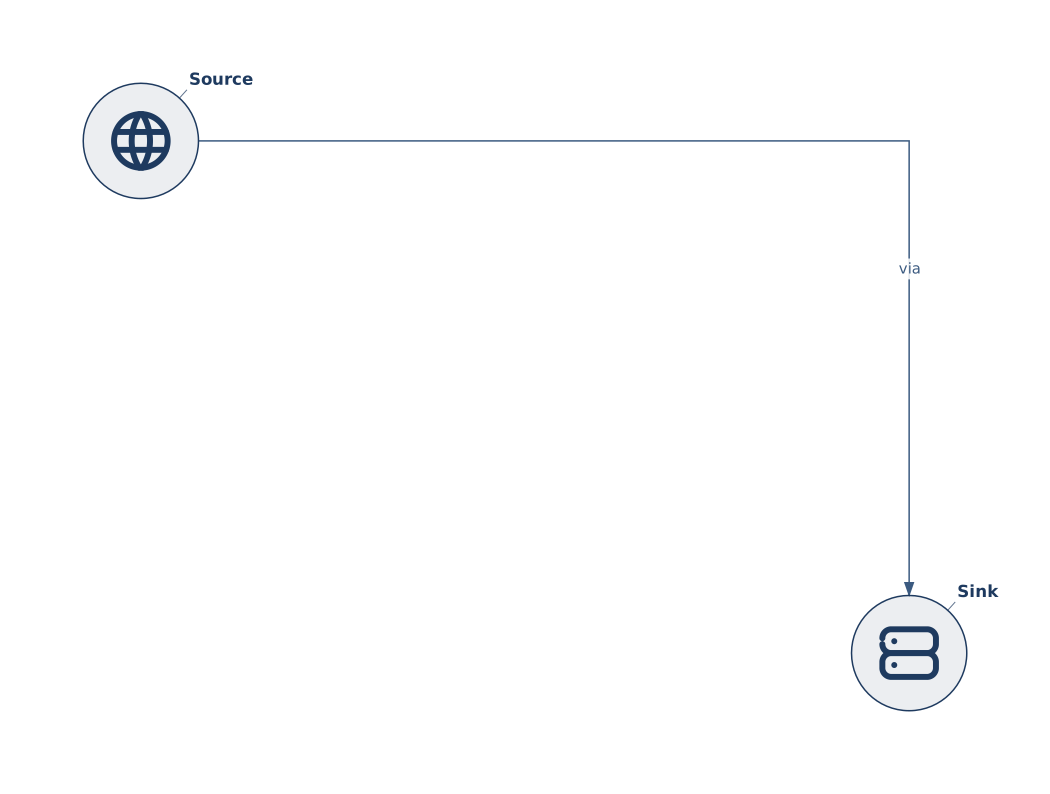
The source (@A1) and sink (@D3) are diagonally apart. Without waypoints you'd get a diagonal arrow cutting through @B2 / @C2. Adding waypoints at (3,0) and (3,1) routes the line right along row 0, then down column 3, producing a clean orthogonal bend.
a --> b "via" {
  waypoints: [{ col: 4, row: 1 }, { col: 4, row: 2 }],
}
Multiple waypoints
a --> b "S-curve" {
  waypoints: [
    { col: 2, row: 2 },
    { col: 2, row: 3 },
    { col: 3, row: 3 },
  ],
}
Waypoints are visited in declaration order. The line stays straight between consecutive waypoints — Gridgram doesn't auto-smooth between them, so the number of waypoints is the number of bends you get plus one.
When the connector has many attributes
For elaborate routing combined with styling, lift the whole connector into a doc { connectors: … } body for multi-line clarity:
doc {
  connectors: [
    {
      from: 'a', to: 'b', arrow: 'end',
      label: 'routed',
      waypoints: [
        { col: 2.5, row: 1 },
        { col: 2.5, row: 3 },
      ],
      nodeMargin: 0.8,
    },
  ],
}
Tuning the arrow tip
nodeMargin (0–1, default 0.6) controls how far back from the node center the arrow tip pulls. Larger values move the tip further out — useful when the default overlaps the node ring.