
仕様
このページは リファレンス です — Gridgram の DSL がそう動く背後のルール。予期せぬエッジケースに遭遇した読者や、.gg をプログラム的に生成したい読者向けです。Guide の各ページは「使い方」を例で示し、このページは「なぜそうなるか」を文法と不変条件で示します。
1. .gg 文法
インフォーマル BNF。大文字はトークン(終端記号)、小文字は非終端記号。| は選択、* は 0 個以上、? は任意、+ は 1 個以上。
file            := statement*
statement       := doc-stmt
                 | icon-stmt
                 | region-stmt
                 | note-stmt
                 | connector-stmt

doc-stmt        := 'doc'    body
icon-stmt       := 'icon'   arg* body?
region-stmt     := 'region' arg* body?
note-stmt       := 'note'   arg* body?
connector-stmt  := IDENT arrow IDENT arg* body?

arg             := id-sigil    |  pos      |  span
                 | target-list |  label    |  attr
                 | word                        # icon src shorthand (icon-stmt only)

id-sigil        := ':' IDENT
pos             := '@' A1_ADDR | '@' INT ',' INT
span            := '@' A1_ADDR RANGE_SEP A1_ADDR
                 | '@' INT ',' INT RANGE_SEP INT ',' INT
RANGE_SEP       := ':' | '-'                 # ':' (Excel) preferred
label           := DQ_STRING | SQ_STRING
target-list     := '(' IDENT (',' IDENT)* ')'
attr            := IDENT '=' (BARE_WORD | DQ_STRING)
body            := '{' <balanced JSON5 object> '}'
arrow           := '-->' | '->' | '<--' | '<->' | '---'
                 | '..>' | '<..' | '<..>' | '...'

# Terminals
A1_ADDR         := [A-Za-z]+ [0-9]+          # "A1", "aa100", "AAA9999"
INT             := [0-9]+
IDENT           := [A-Za-z_] [A-Za-z0-9_-]*
BARE_WORD       := any run of non-whitespace, non-';', '{', '(', '"', "'"
DQ_STRING       := '"' (. | '\\n' | '\\"' | '\\\\' | '\\t')* '"'
SQ_STRING       := "'" (. | '\\n' | '\\'' | '\\\\' | '\\t')* "'"
STMT_END        := '\n' (at depth 0) | ';' (at depth 0)
ステートメント判別 は短い先読みで決定します:
tokens[1]がarrowなら コネクタ。- そうでなければ
tokens[0]はdoc/icon/region/noteのいずれかでなければなりません。
このため icon / region / note / doc は 行頭の識別子 として予約されていますが、それ以外の役割(アイコン参照、コネクタ内のノード ID、ラベル本文、属性値など)ではそのまま自由に使えます。
コマンド語以降の引数は順不同 です。各引数は自身の接頭記号(: / @ / " / ( / =)を持つので、トークナイザは位置に依存せず役割を割り当てられます。
2. 座標系
Gridgram の公開形式はすべて 1-based です。A1 = 列 1・行 1 = 左上。正規化層はレイアウト演算の直前に 0-based へシフトします。
| 形式 | 意味 |
|---|---|
@A1 | 単一セル(Excel 風、推奨) |
@1,1 | 単一セル(数値) |
@A1:B2 | 矩形範囲(Excel 風、推奨) |
@A1-B2 | 矩形範囲(旧区切り、互換) |
@1,1:2,2 | 矩形範囲(数値) |
@1,1-2,2 | 矩形範囲(数値、旧区切り) |
pos: [1, 1] | TS タプル |
pos: { col: 1, row: 1 } | TS 名前付きオブジェクト |
pos: "A1" | TS 文字列 |
A1 列の計算: A=1 … Z=26、AA=27 … AZ=52、BA=53 … ZZ=702、AAA=703 …。小文字も受け付けます(aa100)。col = Σ letter × 26^(n-1-i)、A-Z → 1-26。
バリデーションエラー(パース時または正規化時):
col < 1またはrow < 1→"Grid coordinate is 1-based"- 不正な A1(
@1A、@A0、空)→"Invalid cell address" cols/rowsの範囲外 → 整合性エラー- ノードの
col/rowが非整数 → エラー(ウェイポイントのみ小数可)
自動配置:icon で @pos を省略すると、宣言順に座標が付与されます。row=1 上で col が増加し、cols が設定されていれば折り返します。
3. 解決パイプライン
同じパイプラインをテキストで:
1. scan + tokenize          → Token[]
2. parseStatements          → per-statement ParseLineResult[]
3. parseGg                  → merge doc blocks (deep), concat arrays,
                              assign auto-ids for nameless icons
4. checkIntegrity           → references, bounds, 4-connectivity
5. foldLayers (render-time) → resolve settings (4-layer merge),
                              normalize coords (1-based → 0-based),
                              expand badge presets, auto-position
6. resolveDiagram           → layout, connector routing, label placement
7. render                   → Preact VNode tree → SVG
設定マージ(4 層、後勝ち)
system defaults
  → project config (gridgram.config.{ts,js,json,json5} via walk-up)
    → document doc { … } blocks (deep-merged in source order)
→ CLI / programmatic override配列マージ(doc { nodes/connectors/regions/notes: [...] })
| 配列 | 重複キー | 衝突時 |
|---|---|---|
nodes | id | エラー |
connectors | なし | 連結 |
regions | なし | 連結 |
notes | なし | 連結 |
doc { nodes: [...] } からのノードは DSL で宣言したノードに連結されます。ID はファイル全体で一意でなければなりません。
4. アイコン(src=)解決の優先順位
1. doc { icons: { … } } map      (per-file bare-name aliases)
2. --icons <dir> CLI flag         (per-invocation bare-name map)
3. Path refs                      (./x.svg, @alias/x.svg, /abs/x.svg, https://…)
4. Tabler built-ins               (tabler/<name>, tabler/filled/<name>)
5. otherwise → iconError          (red ring + `{ iconError: true }`)
doc マップが最優先なので、共有の登録に触れることなく単一ファイルだけで上書きできます。
5. ラベル配置
ノードラベル、コネクタラベル、リージョンラベル — すべてのラベルが同じ配置器を通過します。それぞれについて、候補の LabelRect リストを優先順位順に試し、衝突しない最初の矩形を採用します。すべての候補が衝突する場合はフォールバック(通常は先頭候補)を採用し、結果に error: true が立ちます(--no-errors でない限り赤い配置マーカーとして表示されます)。
配置順序
notes (position fixed by @pos)
  → node labels    (by descending connector-degree)
    → connector labels
      → region labels
先に配置したものがセルを占有し、後続はそれを避けます。
候補順
| 種類 | 候補(この順に試行) |
|---|---|
| ノード | top-right、bottom-right、bottom-left、top-left、top-center、bottom-center、left-center、right-center |
| コネクタ | 中央セグメントから外側へ(hop 順)。各セグメント内は中央 → inset 位置 |
| リージョン | top-left、top-right、bottom-right、bottom-left、top-center、bottom-center(union 外に落ちるコーナーは除外) |
ノードラベルは 4 つのコーナー(TR → BR → BL → TL)→ 上下センター(TC → BC)→ 左右センター(LC → RC)の順で評価されます。各層を抜けても収まらない場合は、リーダー線をさらに引き伸ばした tier 2 / tier 3 の候補(同じ 8 方向の繰り返し)に落ちます。
選ばれた tier は NodeLabelResult.tier でレンダラーまで伝搬され、DiagramNode が基準 leaderGap をその tier 倍にして描画します — tier 2 / tier 3 で勝った候補が tier 1 の位置に勝手に折り畳まれることはありません。ユーザー側で方向や長さを固定したい場合は、ガイドの ラベルの方向を固定する を参照してください。label-direction / leader-length の各 style プロパティで、この候補リストを片方の軸(または 1 通りの組み合わせ)に絞り込めます。
デモ:8 方向
下図は 5×5 グリッドの中央 3×3 にだけラベルを配置し、デモノードごとに 7 方向の候補をコネクタで埋める ことで、残った 1 方向にラベルが押し出される様子を可視化したものです。各ラベルの文字(TR MR BR BC BL ML TL TC)が、そのまま配置器が選んだスロット名と一致します。
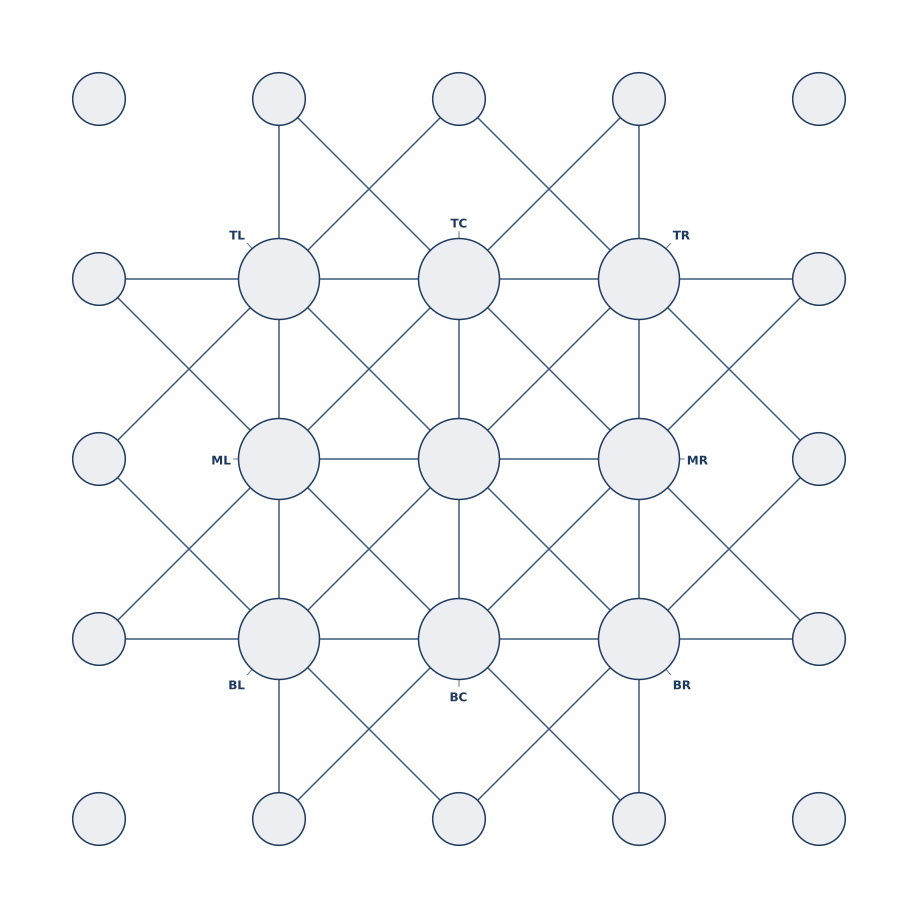
左右中央(ML / MR)は、上下のフォールバックでも収まらないときに最後に試される候補で、コーナーや上下センターが全て塞がる縦長レイアウトで効きます。
衝突ルール
次のいずれかに該当すると矩形は 衝突 と見なされます:
- キャンバス境界を外れる(
boundsが指定されているときのみ)。 - 配置済みの他のラベル矩形と重なる(約 4 px のパディング)。
- コネクタ線セグメントに交差する(約 6 px のパディング)。
- いずれかのノードのアイコン円に重なる(約 4 px のパディング)。ただし自身のラベルを配置中の場合は自身の円を除外。
ルール 4 があるので、@D1 の大きなアイコンは @C1 の小さなアイコンのラベルを別コーナーに押し出します — 他人のグリフの上にラベルは置かれません。
ノードラベルのコールアウト幾何
中心 (x, y)・半径 r のノードについて、各候補コーナー(top-right 等)ごとにラベル矩形が構築されます。引き出し線は次の 2 点を結びます:
- 円上の接地点: 中心
(x, y)からラベル矩形のリーダー先コーナーに向かう半直線と円の交点。言い換えると、リーダーを延長するとノードの中心を通る — リーダーは常に「アイコンの中央を指している」ように読めます。 - ターゲット点: ラベル矩形のうち、ノードに最も近い角。
6. コネクタルーティング
1. Compute straight polyline  (source center → waypoints → target center)
2. Check for cross-through: does the line pass through any *other*
   node's icon disc? If so, step 3.
3. Auto-route: graph BFS on cell-corner intersection points, detouring
   around the offending node's corners. Picks the path with fewest used
   intersections (to reduce visual crossing with prior connectors).
4. Apply nodeMargin pullback: arrow tips retract `nodeMargin * radius`
from each endpoint so they don't overlap the ring.点線(..>、<.. など)は dash: '6 3' を自動設定。明示的な dash="…" が与えられればそちらが優先されます。
7. リージョンのブロブ
リージョンは @pos / @span エントリの union です。
1. Rasterize: build a cols × rows occupancy matrix from the spans.
2. 4-connectivity check: BFS from one filled cell. If any filled
   cell is unreachable, the region is disjoint → integrity error.
3. Trace the boundary: walk the union's edges (clockwise), producing
   a single SVG path.
4. Corner rounding: each convex / concave vertex is rounded with the
   region's radius (clamped to half the neighboring edge length so
   arcs don't intersect).
リージョンのラベル配置は、候補コーナーについて「代表セルが union 内にあるか」を確認した上で、他すべて(ラベル、線、アイコン円)との衝突ループを走らせます。
8. カラー
すべての要素の color フィールドは同じ文法で解決されます:
primary             # theme keyword (unmodified)
accent/60           # theme keyword + 2-digit hex alpha
accent/8            # single-digit alpha → expanded to 88
#e8792f             # hex literal
#e8792f40           # hex literal + alpha
red                 # CSS named color
rgb(200, 0, 0)      # any CSS function
自動 tint
- ノード内部:
colorが設定されていれば(形式を問わず)、ノードの塗りは約 8% の不透明度でその色になります。1 つの属性で「アウトライン + 淡い塗り」が得られます。 - 素のテーマキーワードを持つリージョンの塗り:
region … color=accentは約 7% の不透明度で自動描画されます。color=accent/30やcolor=#aabbccは自動 tint をバイパスし、リテラル値がそのまま使われます。
透過キャンバス
theme.bg = 'transparent' / 'none' / '' → 背景矩形は描画されません。透過キャンバスではコネクタラベルのピル背景が白にフォールバックし、任意の背景に対してもラベルが読みやすいままになります。
9. Z オーダー(背面から前面へ)
1. Canvas background rect     (unless bg is transparent)
2. Regions                    (blob fills)
3. Connectors                 (line + arrowheads + label pills)
4. Nodes                      (ring + icon + badges)
5. Notes                      (leader lines + bubble + text)
6. Labels                     (node, region) painted after their owner
ノートはノードより 上 に乗り、リーダー線が視覚的にグリッドの上に重なります。リージョンは 下 にあり、背景として機能します。
10. 予約語と auto-id
- ステートメント先頭のキーワード:
doc、icon、region、note。キーワードより 後ろ では普通の単語として使えます。 - auto-id: 無名の
iconステートメントには__n1、__n2… が parseGg 時に割り当てられ、どのノードも安定したキーを持ちます。__で始まる識別子は 予約済み で、ユーザコードは避けてください。 - 識別子規則:
[A-Za-z_][\w-]*。先頭に数字は使えません。
11. エラーモデル
エラーは throw されず収集され、(部分的な)DiagramDef と共に返されます。重要度は 3 クラス:
source | 発生源 |
|---|---|
dsl | トークナイザ/各文パーサ(行 N を報告) |
json | doc { … } の JSON5 パース |
check | 整合性(ID 重複、未知参照など) |
CLI 終了コードは 1:1 対応:
1=dslまたはjsonエラーが 1 件以上2=checkエラーが 1 件以上(パース自体は成功)3= I/O / 描画の失敗(ファイル読込、設定読込、PNG ラスタライズ)0= 成功
12. 既定値(早見表)
| 設定 | 既定値 |
|---|---|
cellSize | 256 px |
padding | 2 × max(cellSize × 0.025, 4) |
| ノード直径の比率 | セルの 0.45 |
| 既定の矢印 | end(-->) |
| 既定のコネクタ線幅 | 2 px(strokeWidth) |
| 既定のコネクタ dash | なし(実線) |
| 既定の node-margin | 0.6 |
| リージョン auto-tint α | ~0x12(≈ 7%) |
| ノード auto-tint α | ~0x15(≈ 8%) |
| ラベル padding | ~4 px(矩形-矩形)、~6 px(矩形-線)、~4 px(矩形-円) |
これらは注記がある箇所を除き、要素ごとの属性では調整できません(Guide の Icon › Size、Connector › Styles、Region › Styling、Color › Theme を参照)。