
Specification
This page is the reference — the underlying rules that make Gridgram's DSL behave the way it does. It's for readers who hit a surprising edge case or want to generate .gg programmatically. The Guide pages cover the "how" with examples; this page covers the "why" with grammar and invariants.
1. .gg grammar
Informal BNF. Upper-case names are terminals (tokens), lower-case are non-terminals. | is alternation, * is zero-or-more, ? is optional, + is one-or-more.
file            := statement*
statement       := doc-stmt
                 | icon-stmt
                 | region-stmt
                 | note-stmt
                 | connector-stmt

doc-stmt        := 'doc'    body
icon-stmt       := 'icon'   arg* body?
region-stmt     := 'region' arg* body?
note-stmt       := 'note'   arg* body?
connector-stmt  := IDENT arrow IDENT arg* body?

arg             := id-sigil    |  pos      |  span
                 | target-list |  label    |  attr
                 | word                        # icon src shorthand (icon-stmt only)

id-sigil        := ':' IDENT
pos             := '@' A1_ADDR | '@' INT ',' INT
span            := '@' A1_ADDR RANGE_SEP A1_ADDR
                 | '@' INT ',' INT RANGE_SEP INT ',' INT
RANGE_SEP       := ':' | '-'                 # ':' (Excel) preferred
label           := DQ_STRING | SQ_STRING
target-list     := '(' IDENT (',' IDENT)* ')'
attr            := IDENT '=' (BARE_WORD | DQ_STRING)
body            := '{' <balanced JSON5 object> '}'
arrow           := '-->' | '->' | '<--' | '<->' | '---'
                 | '..>' | '<..' | '<..>' | '...'

# Terminals
A1_ADDR         := [A-Za-z]+ [0-9]+          # "A1", "aa100", "AAA9999"
INT             := [0-9]+
IDENT           := [A-Za-z_] [A-Za-z0-9_-]*
BARE_WORD       := any run of non-whitespace, non-';', '{', '(', '"', "'"
DQ_STRING       := '"' (. | '\\n' | '\\"' | '\\\\' | '\\t')* '"'
SQ_STRING       := "'" (. | '\\n' | '\\'' | '\\\\' | '\\t')* "'"
STMT_END        := '\n' (at depth 0) | ';' (at depth 0)
Statement dispatch is a short peek:
- If
tokens[1]is anarrow, the statement is a connector. - Else,
tokens[0]must be one ofdoc/icon/region/note.
That's why icon / region / note / doc are reserved as line-leading identifiers, but can appear freely in any other role (icon ref, node id in a connector, label text, attribute value, …).
Arguments after the command keyword are order-independent. Each arg carries its own prefix (:, @, ", (, =), so the tokenizer can assign roles without relying on position.
2. Coordinate system
Gridgram is 1-based in every user-facing form. A1 = column 1, row 1 = top-left. Internally the normalizer shifts to 0-based just before layout math.
| Form | Meaning |
|---|---|
@A1 | single cell (Excel-style; preferred) |
@1,1 | single cell (numeric) |
@A1:B2 | rectangular range (Excel-style; preferred) |
@A1-B2 | rectangular range (legacy separator) |
@1,1:2,2 | rectangular range (numeric) |
@1,1-2,2 | rectangular range (numeric, legacy) |
pos: [1, 1] | TS tuple |
pos: { col: 1, row: 1 } | TS named object |
pos: "A1" | TS string |
A1 column math: A=1 … Z=26, AA=27 … AZ=52, BA=53 … ZZ=702, AAA=703 etc. Lower-case is accepted (aa100). col = Σ letter × 26^(n-1-i) with A-Z → 1-26.
Validation errors (parse or normalize time):
col < 1orrow < 1→"Grid coordinate is 1-based"- Malformed A1 (
@1A,@A0, empty) →"Invalid cell address" - Out-of-bounds vs
cols/rows→ integrity error - Non-integer
col/rowon a node → error (waypoints may be fractional)
Auto-layout: when @pos is omitted on icon, positions are assigned in declaration order. col increments along row=1, wrapping at cols if it's set.
3. Resolution pipeline
Textually, the same pipeline:
1. scan + tokenize          → Token[]
2. parseStatements          → per-statement ParseLineResult[]
3. parseGg                  → merge doc blocks (deep), concat arrays,
                              assign auto-ids for nameless icons
4. checkIntegrity           → references, bounds, 4-connectivity
5. foldLayers (render-time) → resolve settings (4-layer merge),
                              normalize coords (1-based → 0-based),
                              expand badge presets, auto-position
6. resolveDiagram           → layout, connector routing, label placement
7. render                   → Preact VNode tree → SVG
Settings merge (4 layers, later wins)
system defaults
  → project config (gridgram.config.{ts,js,json,json5} via walk-up)
    → document doc { … } blocks (deep-merged in source order)
      → CLI / programmatic override
Array merge (doc { nodes/connectors/regions/notes: [...] })
| Array | Dedup key | On collision |
|---|---|---|
nodes | id | error |
connectors | none | concat |
regions | none | concat |
notes | none | concat |
Nodes from doc { nodes: [...] } concatenate with DSL-declared nodes. Ids must be globally unique.
4. Icon (src=) resolution priority
1. doc { icons: { … } } map      (per-file bare-name aliases)
2. --icons <dir> CLI flag         (per-invocation bare-name map)
3. Path refs                      (./x.svg, @alias/x.svg, /abs/x.svg, https://…)
4. Tabler built-ins               (tabler/<name>, tabler/filled/<name>)
5. otherwise → iconError          (red ring + `{ iconError: true }`)
The doc map wins so a single file can override a shared registration without touching anything else.
5. Label placement
All labels — node labels, connector labels, region labels — go through the same placer. For each, a list of candidate LabelRects is tried in priority order; the first non-colliding rect wins. If every candidate collides, the fallback (usually the first candidate) is used and the result is flagged error: true (surfaces as a red placement marker unless --no-errors).
Placement order
notes (position fixed by @pos)
  → node labels    (by descending connector-degree)
    → connector labels
      → region labels
Earlier placements occupy cells; later ones avoid them.
Candidate order
| Kind | Candidates (tried in order) |
|---|---|
| Node | top-right, bottom-right, bottom-left, top-left, top-center, bottom-center, left-center, right-center |
| Connector | middle segment outward (hop order); within a segment: middle → inset positions |
| Region | top-left, top-right, bottom-right, bottom-left, top-center, bottom-center (skipping corners that fall outside the union) |
Node labels evaluate the four diagonal corners first (TR → BR → BL → TL), then the top/bottom centers (TC → BC), then the left/right centers (LC → RC). If no slot in tier 1 fits, the placer walks the same eight in tier 2 / 3 (each tier extends the leader line further from the node).
The placer carries the chosen tier back to the renderer via NodeLabelResult.tier, and DiagramNode multiplies the base leaderGap by it — so a label that the placer pushed to tier 2 / 3 actually draws at its longer offset, not silently collapsed to tier 1. See Pinning the label direction on the user-facing guide for the label-direction / leader-length style properties that filter this candidate list to a single axis or a single combination.
8-direction demo
The figure below sets up a 5×5 grid where the center 3×3 carries demo labels. For each demo node, seven of its eight neighbour cells are connected, blocking the corresponding seven label slots; the remaining unconnected neighbour is the open slot the placer falls through to. Each label literally spells the slot it landed in (TR / MR / BR / BC / BL / ML / TL / TC).
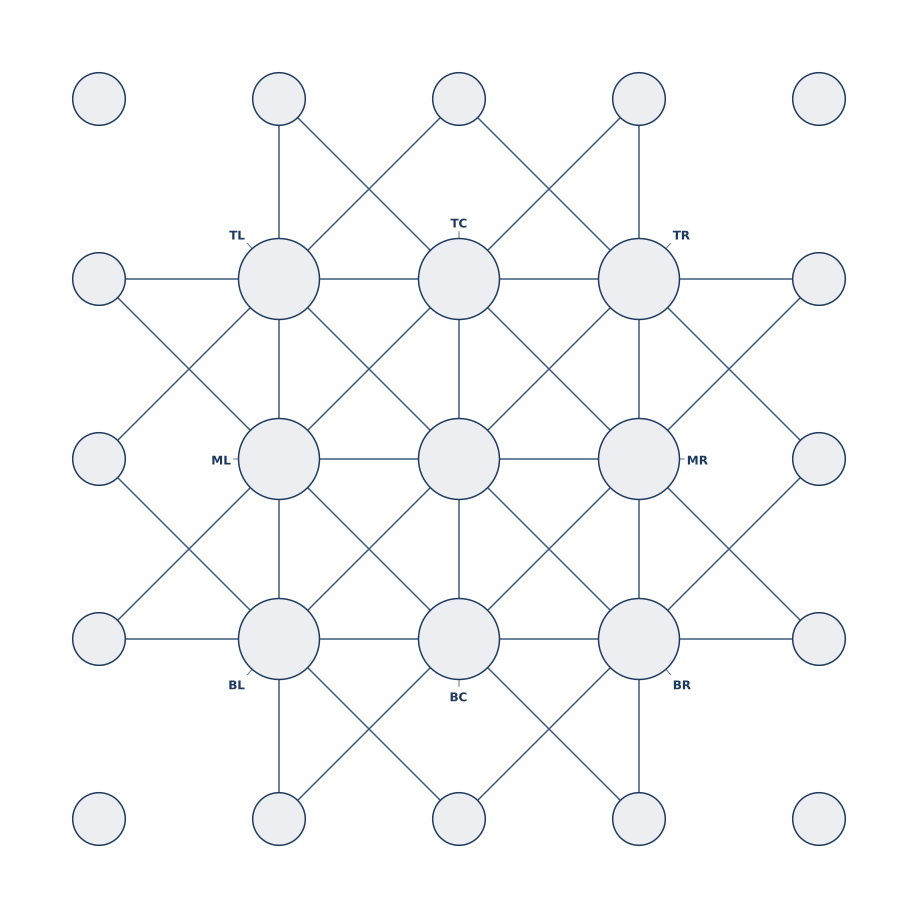
The middle-row sides (ML / MR) are last-resort fallbacks reached only when all corners and the top/bottom centers are blocked — useful in narrow vertical layouts.
Collision rule
A rect collides if any of the following is true:
- It leaves the canvas bounds (only when
boundsis supplied). - It overlaps another already-placed label rect (with ~4 px padding).
- It is crossed by any connector line segment (with ~6 px padding).
- It overlaps any node's icon disc (with ~4 px padding), excluding that node's own disc when placing its own label.
Rule 4 is why a big icon at @D1 pushes the label of a smaller icon at @C1 to a different corner — labels don't get placed on top of other people's glyphs.
Node-label callout geometry
For a node at pixel center (x, y) with radius r, a label rect is constructed for each candidate corner (top-right, etc.). The leader line goes from:
- Edge point: on the circle, on the ray from
(x, y)toward the leader-target corner of the label rect. In other words, extending the leader through the edge hits the node's center — so the leader always reads as "pointing at the middle of the icon". - Target point: the corner of the label rect nearest the node.
6. Connector routing
1. Compute straight polyline  (source center → waypoints → target center)
2. Check for cross-through: does the line pass through any *other*
   node's icon disc? If so, step 3.
3. Auto-route: graph BFS on cell-corner intersection points, detouring
   around the offending node's corners. Picks the path with fewest used
   intersections (to reduce visual crossing with prior connectors).
4. Apply nodeMargin pullback: arrow tips retract `nodeMargin * radius`
   from each endpoint so they don't overlap the ring.
Dashed lines (..>, <.., …) set dash: '6 3' automatically; an explicit dash="…" overrides.
7. Region blob
A region is a union of @pos / @span entries.
1. Rasterize: build a cols × rows occupancy matrix from the spans.
2. 4-connectivity check: BFS from one filled cell. If any filled
   cell is unreachable, the region is disjoint → integrity error.
3. Trace the boundary: walk the union's edges (clockwise), producing
   a single SVG path.
4. Corner rounding: each convex / concave vertex is rounded with the
   region's radius (clamped to half the neighboring edge length so
   arcs don't intersect).
Label placement for regions checks candidate corners for "representative cell is inside the union", then runs the collision loop against everything else (labels, lines, icon discs).
8. Color
Every element's color field resolves through the same grammar:
primary             # theme keyword (unmodified)
accent/60           # theme keyword + 2-digit hex alpha
accent/8            # single-digit alpha → expanded to 88
#e8792f             # hex literal
#e8792f40           # hex literal + alpha
red                 # CSS named color
rgb(200, 0, 0)      # any CSS function
Auto-tint
- Node interior: when
coloris set (any form), the node's fill is the color at ~8% opacity. Gives "outline + pale fill" from one attribute. - Region fill for bare theme keywords:
region … color=accentrenders at ~7% opacity automatically.color=accent/30orcolor=#aabbccbypasses auto-tint — the literal value is used.
Transparent canvas
theme.bg = 'transparent' / 'none' / '' → no background rect is drawn. Connector-label pills fall back to solid white on transparent canvases so labels stay readable against arbitrary backdrops.
9. Z-order (back to front)
1. Canvas background rect     (unless bg is transparent)
2. Regions                    (blob fills)
3. Connectors                 (line + arrowheads + label pills)
4. Nodes                      (ring + icon + badges)
5. Notes                      (leader lines + bubble + text)
6. Labels                     (node, region) painted after their owner
Notes sit above nodes so their leader lines visually overlay the grid; regions sit below so they function as backgrounds.
10. Reserved words and auto-ids
- Statement-leading keywords:
doc,icon,region,note. Anywhere after the keyword they're just normal words. - Auto-ids: nameless
iconstatements receive__n1,__n2, … assigned at parseGg time so every node has a stable key. Identifiers starting with__are reserved for this scheme; user code should avoid them. - Identifier rule:
[A-Za-z_][\w-]*. No leading digit.
11. Error model
Errors are collected (not thrown) and returned alongside the (partial) DiagramDef. Three severity classes:
source | Raised by |
|---|---|
dsl | tokenizer / per-statement parser (line N) |
json | doc { … } JSON5 parse |
check | integrity (duplicate ids, unknown refs, …) |
The CLI exit codes map 1:1:
1= at least onedslorjsonerror2= at least onecheckerror (parse succeeded)3= I/O / render failure (file read, config load, PNG rasterize)0= success
12. Defaults (quick table)
| Setting | Default |
|---|---|
cellSize | 256 px |
padding | 2 × max(cellSize × 0.025, 4) |
| Node diameter fraction | 0.45 of cell |
| Default arrow | end (-->) |
| Default connector width | 2 px (strokeWidth) |
| Default connector dash | none (solid) |
| Default node-margin | 0.6 |
| Region auto-tint alpha | ~0x12 (≈ 7%) |
| Node auto-tint alpha | ~0x15 (≈ 8%) |
| Label padding | ~4 px (rect-rect), ~6 px (rect-line), ~4 px (rect-circle) |
These aren't tunable per-element by any attribute except where noted (see Icon › Size, Connector › Styles, Region › Styling, Color › Theme in the Guide).