
CI / CD
Continuous integration and delivery flows, from a developer's commit to a running production.
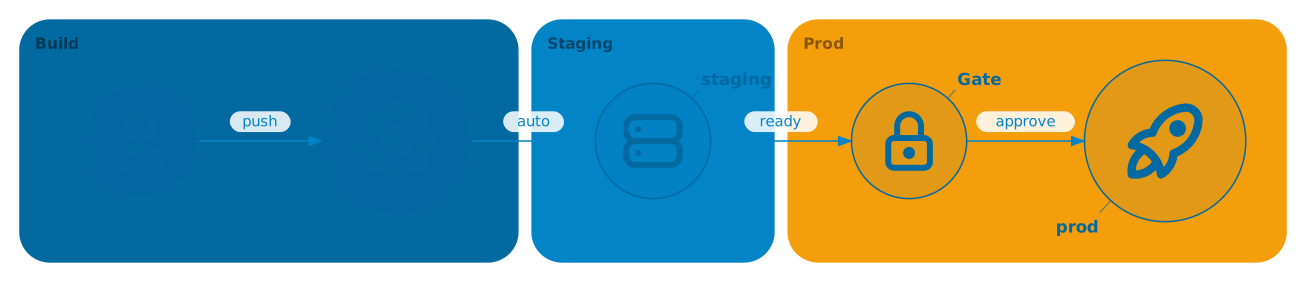
Pipeline with gated promotions
Region bands (three tinted tiers) + success badges + a manual gate marked with extra stroke width. Gives the feel of a control console. Hover the diagram and use ◀ / ▶ to scrub through the three frames — frame 1 is a cold pipeline, frame 2 is CI / staging green, frame 3 is the gate released and prod lit.
Matrix build
A single commit fans out across five workers in parallel. The diagram is deliberately plain — one theme colour, no regions — so it contrasts with the richer examples above and below.
doc { cols: 3, rows: 3 }

icon :src   @A2 tabler/git-commit  "Commit"
icon :n18   @B1 tabler/server      "18/linux"
icon :n20   @B2 tabler/server      "20/linux"
icon :n22   @B3 tabler/server      "22/linux"
icon :merge @C2 tabler/check       "Merge"   sizeScale=1.3

src --> n18
src --> n20
src --> n22
n18 --> merge
n20 --> merge
n22 --> merge
Feature branch preview
Dashed "preview" deploy for peer review; solid path for merge-to- main. A note anchors the decision point so reviewers know what triggers the automation.
doc { cols: 4, rows: 2 }

icon :pr      @A1 tabler/git-pull-request "PR"
icon :preview @B1 tabler/world             "Preview"
icon :merge   @C1 tabler/git-merge         "merge"
icon :main    @D1 tabler/server            "staging"

pr      --> preview "deploy" dash="2 4"
pr      --> merge
merge   --> main    "promote" width=2

note @B2 (preview) "URL posted\nback to the PR"
Deployment topology
Final CI step: one artefact, one binary, many runtimes. The hub carries the visual weight via sizeScale.
doc { cols: 3, rows: 2 }

region @A1:C1 "Artefact" color=primary/28
region @A2:C2 "Runtimes" color=secondary/24

icon :art @B1 tabler/package "Artefact" sizeScale=1.5
icon :r1  @A2 tabler/brand-ubuntu   "Linux"
icon :r2  @B2 tabler/brand-apple    "macOS"
icon :r3  @C2 tabler/brand-windows  "Windows"

art --> r1
art --> r2
art --> r3